


PAN Card Verification
PAN Card verification is a simple and mandatory process to check whether a PAN number is valid and belongs to the correct person or business. It helps avoid fraud and ensures proper identity verification. PAN verification can be done online through government websites such as the Income Tax Department and Protean (formerly known as NSDL).

What is Online PAN Verification?
Online PAN Card verification is a digital process facilitated through specific government portals to check whether the PAN number is valid. Protean (formerly known as NSDL), an authorized entity by the Income Tax Department, offers PAN Card verification services to eligible entities.
Types of PAN Card Verification

There are mainly three modes of verification for PAN Cards online, which are
1. File-Based PAN Card Verification
This technique is designed for governments or organizations that need to validate up to 1,000 PAN Cards simultaneously; to use this service, the user must log in to the e-governance website.
2. Screen-Based PAN Card Verification
This method enables the user to validate up to five PAN Cards simultaneously; to use it, the user must log in to the e-governance website
3. Software (API)-Based PAN Card Verification
This solution enables PAN verification through a website's software application.
Also check : Learn Importance of Bulk PAN Verification
Step by Step Process for Online PAN Verification
Here's a simplified method to verify your PAN Card status online using your name and date of birth:
Step 1 - Visit the e-Filing Portal website
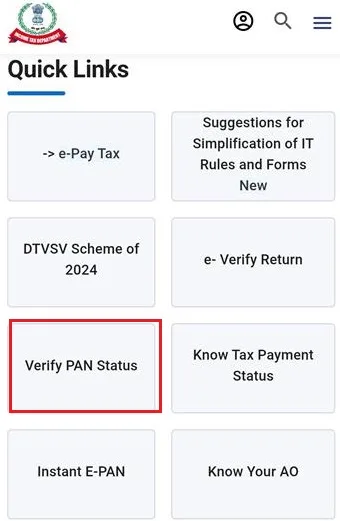
Step 2 - Select the 'Verify PAN Status' option in the left-hand panel.
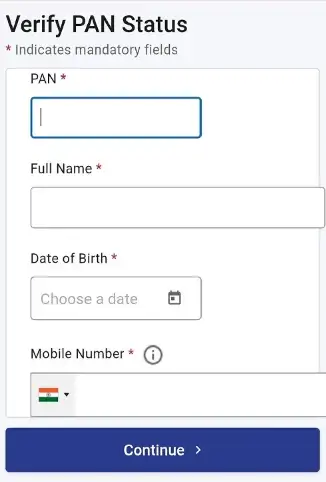
Step 3 - Enter your PAN Card number, name (as per the PAN Card), date of birth, and mobile number. Then, click on 'Continue.'
Step 4 - Enter the six-digit OTP received on your mobile number and click 'Validate'.
Step 5 - Once the verification process is completed, your PAN Card status will be displayed on the screen.
PAN Verification by PAN Number
Use the following steps for verifying a PAN Card using a 10-digit alphanumeric PAN number:
Step 1 - Visit the official website Income tax e portal.
Step 2 - Enter 10 digit PAN number, full name, date of birth and registered mobile number
Step 3 - Click on 'Continue'.
Step 4 - Input the OTP received on your mobile number and click 'Validate'.
Step 5 - After clicking on Validate Button ,you will get the message your PAN is verify or not.
PAN Verification by Aadhaar Card
To authenticate your PAN using your Aadhaar Card, adhere to these steps:
Step 1 - Go to the income tax e-filing website.
Step 2 - Find the 'Check PAN-Aadhaar Link Status' option listed under 'QUICK LINKS.'
Step 3 -You'll be redirected to the Check PAN-Aadhaar Link Status page.
Step 4: You will see two options – Link Aadhaar and View Status. Click on View Status and then click Continue.
Step 5 - Enter your Aadhaar number and PAN number.
Step 6 - You will be able to see your PAN status.
How to Verify PAN Card Under Section 194N?
Given below are the steps that must be followed to complete the verification of Applicability under Section 194N:
Step 1 - Go to the official website.
Step 2 - Select ‘TDS On Cash Withdrawal’.
Step 3 - Input the PAN and mobile number’.
Step 4 - Consent to the declaration and proceed by clicking ‘Continue’.
Step 5 - Enter the OTP sent to your registered mobile number and click ‘Continue’.
Step 6 - View the percentage of TDS deductible displayed.
How to Verify the PAN Card Issued by the Company?
UTI Infrastructure Technology and Services Limited is among the biggest financial services companies in the country. They are owned by the Government of India and provide financial technology to the financial sectors of the government. UTIITSL like NSDL provides PAN Cards for the Indian population who apply from their website.
To verify, you must visit the UTIITSL PAN website and log in with your credentials. Once done, you will have to select the option to verify your PAN Card by adding the required details. The website will then display the results.
Benefits of Online PAN Card Verification
There are numerous benefits to verifying a PAN Card online.
- ✅ The online verification for PAN Cards aims to check whether your PAN Card is still valid and available in the Income Tax Department’s database.
- ✅ You can also make sure your PAN Card is not deactivated, deleted, or duplicated through online verification.
- ✅ With online verification, it is easier to check the status of your PAN Card.
- ✅ You can conveniently check the status of Your PAN Card online, to ensure that it is valid and updated.
- ✅ Online verification guarantees accuracy and reduces errors in PAN Card details.
- ✅ The online verification process also eliminates many security threats such as identity theft.
- ✅ However, the major benefit of doing PAN verification online is that it makes the process quick and simple for users.
Eligibility for PAN Card Verification
Given below is a list of all the individuals and groups who are eligible for PAN verification.
The PAN verification facility is offered to the below-mentioned entities:
- Government Agencies (central or state)
- Income Tax Projects
- Reserve Bank of India
- Department of Commercial Taxes
- Stamp and Registration Department
- Central Vigilance Commission
- Payments Bank approved by RBI
- Payment And Settlement System Operators authorised by RBI
- Open Network for Digital Commerce (ONDC)
- Insurance Web Aggregators
- Non-banking Financial Companies approved by RBI
- Prepaid Payment Instrument Issuers approved by RBI
- Housing Finance Companies
- Insurance Company
- Insurance Repository
- Companies and Government deductor (Required to file TDS/TCS return)*
- Public Finance Management System (PFMS)
- PFRDA approved Point of Presence (For Online Platform)
- Direct (Life & General) Brokers approved by IRDAI
- RBI approved Authorised Dealer – Category II
- Mutual Fund Advisor
- Registrar & Transfer agents approved by SEBI
- Investment Advisor approved by SEBI
- Banks
- Mutual Funds
- Credit card Companies or Institutions
- Central Recordkeeping Agency of National Pension System
- DSC issuing Authorities
- Depository Participants
- Credit information companies approved by RBI
- KYC Registration Agency (KRA) or Central KYC Registry
- Educational Institutions established by Regulatory Bodies
- Companies (Required to furnish Annual Information Return (AIR) or Statement of Financial Transaction (SFT)
- Any other entity required to furnish Annual Information Return (AIR) or Statement of Financial Transaction (SFT)
- Stock Exchanges or Commodity Exchanges or Clearing Corporations
- Goods and Services Tax Network
- Depositories
Details Required for Online PAN Verification Registration
Details of payment required to register for the Online PAN Card Verification | Organizational details needed to register for Online PAN Number Verification | Digital Signature Certificate details required to register for PAN Verification |
|
|
|
List of Documents Required for PAN Verification
Organizational Information
- Name of the organization
- The organization's PAN and TAN
- Contact information for the organization
- The organization's personal information
- Category of organization.
Digital Signature Certificate Details
- The name of the certifying authority
- Digital signature certificate class
- Digital signature certificate serial number
- The DSC's validity period
Payment Information
- Method of payment
- The amount of the payment
- Number of payment instruments
- The name of the issuing bank and branch
- The payment instrument date.
Responses to Users Regarding PAN Verification
PAN Verification | The Response Given to User |
Valid PAN with events such as acquisition, merger, etc. | Name of PAN holder, PAN status along with event, Name printed on the card, and Last date of the PAN update |
Valid PAN | PAN status, Last date of PAN update, Name printed on the PAN Card, and Name of PAN holder |
Fake PAN | The PAN Card will be displayed as 'Fake' without any other details. |
Deactivated or Deleted | The status of the PAN Card will be displayed as 'deactivated' or 'deleted'. |
PAN Card not found | The message 'not present in the Income Tax Department database' will appear. |
Common PAN Online Verification Errors
Errors during online PAN verification can occur due to a number of reasons. Such errors can be corrected online or offline. Here are the most common PAN verification errors that users might come across:
Invalid PAN: This error indicates that your PAN Card is invalid. When this error appears, you may not be able to find your PAN Card in the Income Tax Department’s database.
PAN Deactivated: This error comes up when your PAN Card is inactive. This could happen due to various reasons. However, if this error appears on the screen, it is important to reactivate it quickly.
Name or Date of Birth Mismatch: Errors regarding personal details are common errors during the online PAN verifications. Spelling errors in names and mismatches in the date of birth between the PAN Card and other documents must be corrected as soon as possible.
Gender Errors: Mistakes regarding the gender of the PAN Card holder are another frequent error in PAN Card verification. Such errors can be rectified online.
AI-Based OCR Solution for PAN Verification
An AI-Based OCR Solution for PAN Verification is a smart technology that automatically reads and checks a PAN Card. It quickly picks up important details like the name, PAN number, and date of birth, even if the image is blurred, tilted, or clicked in low light. The AI helps in preventing fraud by checking whether the PAN Card is real, fake, or tampered with.
This makes the digital KYC process much faster and easier, as businesses no longer need people to manually review each document. Banks, fintech apps, lending companies, and other platforms can verify users in just a few seconds. Moreover, it provides smooth onboarding and handles large numbers of customers without delays.
Other Important Links
NSDL and UTITSL PAN Verification
Also Check
FAQs on PAN Verification
1.What are the annual registration charges for availing online PAN verification?
The annual registration charges for all the three verification methods under online PAN verification is Rs.12000+ Goods and Service Tax (GST).
2.How to track the status of registration for online PAN verification?
Any organisation that attempts to register for online PAN verification can check its registration status by using the acknowledgement number that is provided to them.
3.Will I need to enter the full name for PAN verification?
Yes, you will need to enter the first name, middle name, and last name for the PAN verification process.
4.Will I need to pay any initial advance for PAN verification?
You will need to pay an initial advance as per your wish.
5.Can an entity renew its PAN verification facility?
Yes, an entity can renew its PAN verification system online by logging into the official website with user ID and the digital signature. The entity will then have to choose ‘Renewal of facility’ option and then click ‘Submit’.
6.For how long can I avail this facility?
Once you register for online PAN verification, it can be used for a year.

Karishma VP has over a decade of experience in content writing which includes over five years specializing in personal finance. Her career in BankBazaar has given her the opportunity to write on a wide variety of financial products ranging from credit cards and home loans to insurance policies and government schemes. She believes that an understanding of personal finance is an important step to leading an independent, empowered life. This has led to her being passionate about learning more about the BFSI sector and writing about personal finance as clearly, concisely, and accurately as possible to make it accessible to a larger audience through BankBazaar.

Disclaimer
Credit Card:
Credit Score:
Personal Loan:
Home Loan:
Fixed Deposit:


Copyright © 2026 BankBazaar.com.